

Product Search
Connect an external provider's catalog API so that Mercado Eletrônico can search products and offers in real time.
The Product Search template connects ME to the REST API of a catalog provider, such as a distributor, manufacturer or marketplace. When a user searches for products in ME, iPaaS calls the provider's API, converts the response to the ME catalog format and returns the result right away (synchronous response).
No product is copied to ME: the data comes from the provider on every search.
When to use
- You want buyers to see in ME the products, prices and availability of an external provider, always up to date.
- The provider offers a REST API for product search, product detail and, optionally, offers.
Prerequisite: connector
This template requires a connector registered for the provider, with:
- the base URL and the authentication of the provider's API;
- a resource for each endpoint used: search/listing, product detail and, if available, offers;
- if needed, the request mapping of each resource, to adapt the ME parameters to the provider's format.
Operations
| Operation | Required | What it does | Input parameters |
|---|---|---|---|
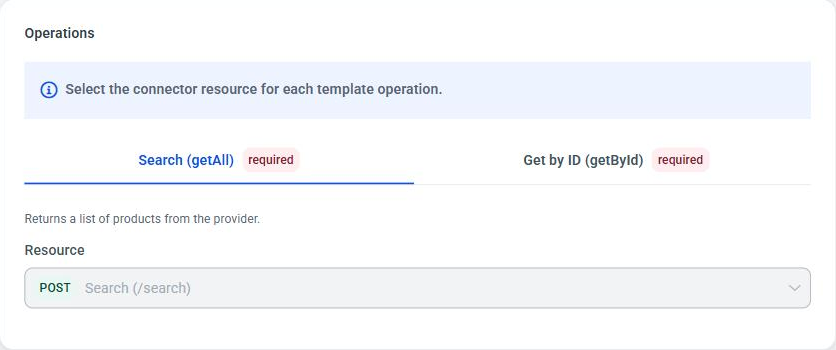
| Search (getAll) | Yes | Returns the provider's product list for a search term, with pagination. | searchTerm, pageNumber, pageSize |
| Get by ID (getById) | Yes | Returns the detail of a product, with the featured offer and the other offers. | productId |
| Get offers (getOffers) | No | Returns the price offers of a product. | productId |
Configuring
Create the integration in Integrations > Templates > Product Search > Use template and follow the wizard steps:
- Parameters:
- Connector: the provider's connector. If it does not exist yet, use Create new connector.
- ME Supplier ID: the identifier of the supplier in ME to which this provider's products are linked.
- Operations: choose the connector Resource that serves each operation.
- Document structure: for each configured operation, load the provider's real response. iPaaS detects the available fields from it.
- Mapping data: for each operation, connect the fields of the provider's response (Origin) to the ME catalog fields (Destination), with the help of the AI. See AI mapping.
- Test: run each operation against the provider, providing a Search term (getAll) or a Product ID (getById and getOffers), and check the Response. The required operations must pass for you to continue.
- Review and publish: check the Operations & structure and the Test result, and publish.
📘 Note
In this template you can test as many times as you need, even after the integration becomes Validated. This way you can adjust the mapping and test again before publishing.
ME catalog format (target)
The result of each operation is always converted to the format below. Fields marked as required must be mapped.
getAll
| Field | Type | Required |
|---|---|---|
items | list | Yes |
items.productId | string | Yes |
items.description | string | Yes |
items.currency | string | Yes |
items.complement | string | |
items.clientGroupDescription | string | |
items.manufacturer | string | |
items.additionalFields.brand | string | |
items.additionalFields.url | string | |
items.additionalFields.picture | list of { url } | |
items.additionalFields.featuredOffer.price | number | Yes, if there is a featuredOffer |
items.additionalFields.featuredOffer.availability | string | Yes, if there is a featuredOffer |
totalItems | integer | Yes |
getById
The same fields as a getAll item (productId, description and currency required), plus:
| Field | Type |
|---|---|
additionalFields.featuredOffer.seller | string |
additionalFields.featuredOffer.condition | string |
additionalFields.offers | list of { id, price, currency, availability, seller } |
getOffers
| Field | Type | Required |
|---|---|---|
additionalFields.featuredOffer.id | string | Yes |
additionalFields.featuredOffer.price | number | Yes |
additionalFields.featuredOffer.currency | string | Yes |
additionalFields.featuredOffer.availability | string | Yes |
additionalFields.featuredOffer.seller | string | |
additionalFields.featuredOffer.condition | string | |
additionalFields.offers | list of { id, price, currency, availability, seller } |
Running
The caller of the integration is ME itself, during product search. That is why this template has no credential screen: when you publish, the portal shows a confirmation and returns to My Integrations. To test, use the wizard's Test step.
On every search, ME sends the operation and the parameters below, which reach the provider according to the connector's request mapping:
| Operation | Parameters |
|---|---|
getAll | searchTerm (search term), pageNumber (page, starting at 1) and pageSize (items per page) |
getById and getOffers | productId (product code at the provider) |
If the provider numbers pages from 0, use pageNumber - 1 in the request mapping. iPaaS does not enforce a maximum pageSize.
Response
The response is synchronous, and the converted result comes in the mePayload field, in the catalog format of the operation:
200 OK{
"correlationId": "{correlationId}",
"mePayload": {
"items": [ { "productId": "{...}", "description": "{...}", "currency": "{...}" } ],
"totalItems": {total number of products}
}
}In getAll, the response always comes in the { items, totalItems } format. If the mapping returns only the product list, iPaaS builds this format and fills totalItems with the number of items received from the provider. For ME pagination to work, map totalItems from the total number of results reported by the provider. If the provider returns more items than the requested pageSize, iPaaS cuts the list to the requested page.
Provider errors appear with failedAtStep = API_REQUEST and errorSource = PROVIDER, which tells them apart from errors in iPaaS processing (those come without errorSource):
| Situation | Status | errorCode | detail |
|---|---|---|---|
The provider rejected the request (4xx) | Same as the provider's | PROVIDER_API_CLIENT_ERROR | The provider API rejected the request with HTTP {status}. Provider message: {message} |
The provider returned an error (5xx) | 502 | PROVIDER_API_SERVER_ERROR | The provider API returned HTTP {status}. Provider message: {message}. The provider's original status comes in upstreamStatus. |
| The provider could not be reached | 502 | PROVIDER_API_UNREACHABLE | Could not reach the provider API. |
| Authentication with the provider failed (e.g. OAuth2 token endpoint) | 502 | PROVIDER_AUTH_FAILED | Could not authenticate with the provider API: {reason} |
| The provider did not respond in time | 504 | PROVIDER_API_TIMEOUT | The provider API did not respond in time. |
{message} is the message the provider sent in a JSON error body, taken from the first of the fields message, error_description, error, detail or title (limited to 200 characters). If the body has no such field, or is plain text or HTML, only the status is shown: iPaaS never passes on the provider's raw body. See Executions.
Limitations
- Requires a connector. Without a connector with the resources configured, the integration cannot be tested or published.
- Three fixed operations:
getAll,getByIdandgetOffers. You cannot create new operations. - Fixed ME parameters: searches only send
searchTerm,pageNumber,pageSizeandproductId. Other provider filters can only be sent as a fixed value in the request mapping. - Fixed target format: the result must fit the ME catalog format described above.
- Real time: each search depends on the provider's availability and response time. If the provider is down, the search fails.
- Generate Purchase Order appears on the screen, but is not available yet (coming soon).
- REST APIs with JSON only. See the connector limitations.