

Expressions guide
The rules iPaaS uses to convert each field, with examples of source, expression and result.
Each mapping link is an expression: a short rule that defines how to get the value of a target field from the source. In most cases you do not need to write any expression. The AI generates all of them, and you can request adjustments in your own words in the Transformation panel or in the Assistant. This guide explains how iPaaS maps, so that you understand what was generated, know what to ask for and, if you want, edit the expression directly.
📘 Note
iPaaS expressions use the JSONata syntax. You do not need to learn JSONata to use iPaaS. Everything required for mapping is described here, and iPaaS accepts exactly the constructs in this guide.
How to read the examples
Each example shows three parts:
- Source: the excerpt of the source JSON (the ERP sample in Inbound, the ME document in Outbound).
- Expression: the rule that produces the value of the target field.
- Result: the value that reaches the target.
Basic elements of an expression:
| Element | How to write it | Example |
|---|---|---|
| Source field | Names separated by a dot | PedidoCompra.C7_NUM |
| Fixed text | Between single quotes | 'EMPRESA' |
| Fixed number | Without quotes | 1 |
| True, false, null | Without quotes | true, false, null |
| Function | Starts with $ | $uppercase(PedidoCompra.C7_NUM) |
1. Referencing fields
Every path starts directly at the first level of the source and goes down through the objects with ..
Source
{ "PedidoCompra": { "C7_NUM": "000123", "C7_XNOME": "ACME", "C7_TIPO": "N" } }| Target | Expression | Result |
|---|---|---|
Header.clientOrderId | PedidoCompra.C7_NUM | "000123" |
Header.vendorName | PedidoCompra.C7_XNOME | "ACME" |
❗️ Attention
Do not use prefixes before the first level, such as
$.PedidoCompra,source.PedidoCompraorinput.PedidoCompra. The path always starts at the name of the top-level field, and an expression with a prefix is rejected.
In Outbound, the ME document always has a single top-level field, named after the entity (for example order for orders and preOrder for pre-orders). All related information is inside it, so paths always start with that name: order.summary, order.items.quantity, order.items.taxInformation.calculationBasis. A path such as items.quantity, without order., finds nothing.
2. Direct copy
This is the most common case: the source value goes to the target unchanged. With the source from item 1:
| Target | Expression | Result |
|---|---|---|
Header.orderType | PedidoCompra.C7_TIPO | "N" |
The AI links fields by meaning, not only by name: C7_NUM → clientOrderId, CompanyCode → businessOrganizations.code. The confidence percentage indicates how sure it is. Identical names get high confidence, while synonyms or abbreviations get lower confidence and usually end up pending review.
3. Objects and nested fields
You do not need to worry about the target structure: iPaaS builds the intermediate objects on its own. Each expression handles a single final field, and iPaaS gathers all the fields that share the same object.
With the source from item 1:
| Target | Expression |
|---|---|
Header.clientOrderId | PedidoCompra.C7_NUM |
Header.vendorName | PedidoCompra.C7_XNOME |
Header.orderType | PedidoCompra.C7_TIPO |
Result
{ "Header": { "clientOrderId": "000123", "vendorName": "ACME", "orderType": "N" } }4. Fixed values
Use a fixed value when the target always requires the same value, with no match in the source.
| Target | Expression | Result |
|---|---|---|
businessOrganizations.virtualEntityField | 'EMPRESA' | "EMPRESA" |
| A text field with the document type | 'PurchaseOrder' | "PurchaseOrder" |
| A numeric field | 1 | 1 |
Do not confuse the text 'null' with the null value, which is null, without quotes.
📘 Note
The AI does not create fixed values on its own to complete the target. Fields without a source are left unlinked, and you decide what to do with them. The exception is when the sample itself makes it clear that the value is a constant, such as fixed parameters of a provider's request.
5. Lists
Lists (arrays) are the most important part of the mapping. iPaaS has two ways of filling a target list, and the choice depends on whether or not the source has a matching list.
5.1 List to list: one target item for each source item
When there is a list in the source, iPaaS iterates over that list and generates one item in the target for each source item. Inside the list, fields are referenced from the item, not from the beginning.
Source
{
  "PedidoCompra": {
    "C7_NUM": "000123",
    "C7_EMISSAO": "20250115",
    "Itens": [ { "C7_ITEM": "10", "C7_QTDE": "5", "C7_PRECO": "12.50" } ]
  }
}
Iterated list: PedidoCompra.Itens
| Target | Expression (relative to the item) |
|---|---|
Header.items.itemNumber | $number(C7_ITEM) |
Header.items.quantity | $number(C7_QTDE) |
Header.items.unitPrice | $number(C7_PRECO) |
Result
{ "Header": { "items": [ { "itemNumber": 10, "quantity": 5, "unitPrice": 12.5 } ] } }With more items in the source, the target gets one item for each of them. In full notation, this rule looks like this:
[PedidoCompra.Itens.{ 'itemNumber': $number(C7_ITEM), 'quantity': $number(C7_QTDE), 'unitPrice': $number(C7_PRECO) }]Rules for this form:
- The target is always a list. Even if the ERP sends a single item as an object, and not as a list, the target gets a list with one item.
- All fields of the same target list iterate over the same source list, written exactly the same way. If one field uses
PedidoCompra.Itensand another usesItens, iPaaS generates parallel lists instead of a single one. The board warns you when this happens. - Never build a list by joining loose fields from different lists. The values of a target item come from the same source item.
5.2 List built from single fields
When the target is a list but the source does not have a matching list, iPaaS builds a single item with values from anywhere in the source, including from different structures, and with fixed values. Here the paths are full paths, from the beginning of the source.
Source
{
  "PurchaseOrder": { "CompanyCode": "0001" },
  "CompanyCode": { "Description": "Matriz SP" }
}| Target | Expression |
|---|---|
businessOrganizations.code | PurchaseOrder.CompanyCode |
businessOrganizations.description | CompanyCode.Description |
businessOrganizations.virtualEntityField | 'EMPRESA' |
Result
{
  "businessOrganizations": [
    { "code": "0001", "description": "Matriz SP", "virtualEntityField": "EMPRESA" }
  ]
}
❗️ Attention
In the same target list, use only one form: either all fields iterate over the same source list (5.1), or all of them come from single fields (5.2). Mixing the two forms in the same list causes a conflict when the document is assembled.
5.3 Using, inside the item, a value that is outside the list
Inside an iterated list, paths are relative to the item. To bring in a value that is outside the list, such as a header field, start the path with $$.. $$ represents the beginning of the source.
Source
{ "notaDe": "minha anotação", "itens": [ { "orderId": 1 }, { "orderId": 2 } ] }Iterated list: itens
| Target | Expression (relative to the item) |
|---|---|
items.orderId | orderId |
items.note | $$.notaDe |
Result
{
  "items": [
    { "orderId": 1, "note": "minha anotação" },
    { "orderId": 2, "note": "minha anotação" }
  ]
}
Without $$., iPaaS would look for notaDe inside each item, would find nothing, and the field would be left empty without any error.
In Outbound, the rule is the same: $$.order.summary brings the order summary into each item.
5.4 Information inside items
Information inside an item is accessed from the item, with the full path to it.
Source (Outbound)
{
  "order": {
    "id": "39581903",
    "summary": "Compra de material",
    "items": [
      { "id": "6", "code": "ITM-01", "quantity": 33.0, "taxInformation": { "calculationBasis": 100.0 } }
    ]
  }
}
Iterated list: order.items
| Target | Expression (relative to the item) | Result |
|---|---|---|
PurchaseOrderItem.OrderQuantity | $string(quantity) | "33" |
PurchaseOrderItem.TaxBasis | $string(taxInformation.calculationBasis) | "100" |
If the nested information is itself a list, for example several taxes per item (order.items.taxInformation.taxes), it is iterated inside the item in the same way as in section 5.1. The target then gets a list of taxes in each item.
5.5 Fixed instances: businessOrganizations and attributes
In ME, the businessOrganizations lists (organizations: company, purchasing organization, plant, branch...) and attributes lists are usually filled from several single fields of the ERP, and each field represents a different item. For these cases, iPaaS builds one instance per entity, identified by the position [0], [1], [2]...
Source
{
  "CompanyCode": "M001",
  "CompanyName": "MD ENGENHARIA",
  "PurchasingOrganization": "01",
  "Attr2": "atributo"
}| Target | Expression |
|---|---|
businessOrganizations[0].code | CompanyCode |
businessOrganizations[0].description | CompanyName |
businessOrganizations[0].virtualEntityField | 'EMPRESA' |
businessOrganizations[1].code | PurchasingOrganization |
businessOrganizations[1].virtualEntityField | 'ORGANIZACAO_COMPRAS' |
attributes[0].name | 'Atributo fixo' |
attributes[1].name | Attr2 |
In the example, attributes[0] receives a fixed value ('Atributo fixo'), and attributes[1] comes from the source field Attr2.
Result
{
  "businessOrganizations": [
    { "code": "M001", "description": "MD ENGENHARIA", "virtualEntityField": "EMPRESA" },
    { "code": "01", "virtualEntityField": "ORGANIZACAO_COMPRAS" }
  ],
  "attributes": [ { "name": "Atributo fixo" }, { "name": "atributo" } ]
}
Rules for instances:
- They apply to
businessOrganizationsandattributesat the first level of the document and also to the nested listsitems.attributes,items.businessOrganizations,locations.businessOrganizations,requestItems.attributesandrequestItems.businessOrganizations. They do not apply to other lists, such asitems. - In a nested list, the same instances repeat in every item of the parent list, each one with that item's values. See the example below.
- With a single entity in the source, there are no instances: form 5.2 applies.
- All fields of the same entity use the same position:
CompanyCodeandCompanyNamedescribe the same company, so both go to[0]. - Positions are sequential starting at
[0], in the order in which the fields appear in the source. - When a list uses instances, all of its fields use a position. Do not mix
businessOrganizations.codewithbusinessOrganizations[1].code. - Classification fields, such as
virtualEntityFieldandentityType, are codes configured for your organization in ME. The AI only fills them in when the name of the source field makes the entity unambiguous. When in doubt, the field is left for you to complete. Suggestions with instances have limited confidence and appear as pending review.
On the mapping board, use Add instance to create a new position and Remove instance to delete it. The following positions are renumbered.
Example with a nested list (items.attributes)
Source:
{
  "itens": [
    { "codigo": "A1", "cor": "azul", "material": "aco" },
    { "codigo": "B2", "cor": "verde", "material": "plastico" }
  ]
}
Iterated list: itens
| Target | Expression (relative to the item) |
|---|---|
items.code | codigo |
items.attributes[0].name | 'Cor' |
items.attributes[0].value | cor |
items.attributes[1].name | 'Material' |
items.attributes[1].value | material |
Result: both instances appear in every item, with that item's values.
{
  "items": [
    { "code": "A1", "attributes": [ { "name": "Cor", "value": "azul" }, { "name": "Material", "value": "aco" } ] },
    { "code": "B2", "attributes": [ { "name": "Cor", "value": "verde" }, { "name": "Material", "value": "plastico" } ] }
  ]
}
5.6 Choosing one item from a list for a single field
Sometimes the source is a list and the target accepts only one value. For example, in Outbound, the ERP wants a single CompanyCode field, but the ME document has a businessOrganizations list with the company, the plant and other organizations. In these cases iPaaS needs to know which item to use.
The recommended way is to choose the item by a field that identifies it.
Source (Outbound, pre-order)
{
  "preOrder": {
    "businessOrganizations": [
      { "code": "111111", "description": "MATRIZ", "virtualEntityField": "EMPRESA" },
      { "code": "131313", "description": "Demonstração 2", "virtualEntityField": "CENTRO" }
    ]
  }
}| Target | Expression | Result |
|---|---|---|
CompanyCode | preOrder.businessOrganizations[virtualEntityField = 'EMPRESA'].code | "111111" |
Plant | preOrder.businessOrganizations[virtualEntityField = 'CENTRO'].code | "131313" |

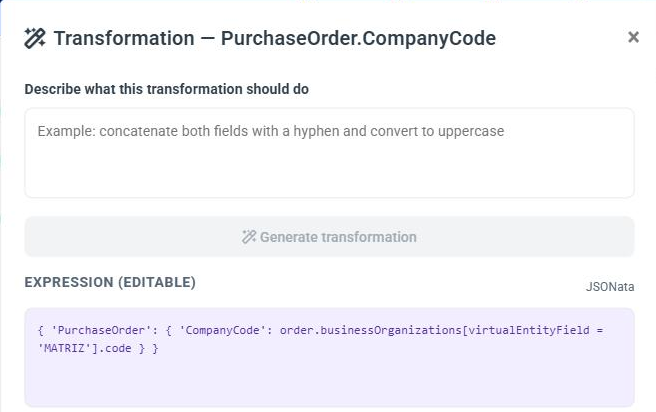
In the demo flow shown in the figure, the ME order has the organization with virtualEntityField = MATRIZ, and the AI generated order.businessOrganizations[virtualEntityField = 'MATRIZ'].code for the SAP CompanyCode. The board shows the applied choice on the link line itself (virtualEntityField = MATRIZ); click it to review or change the field and the value.
On the board, these links appear with the Choose item warning. Click the warning and enter the Field and the Value that identify the item (in the example, virtualEntityField = EMPRESA).
Choosing by position ([0], [1]) should only be used when no field identifies the items:
| Target | Expression | Result with the source above |
|---|---|---|
PurchasingOrganization | preOrder.businessOrganizations[1].code | "131313" |
❗️ Attention
The order of the items in a list is not guaranteed. If the list comes in a different order in another document, position
[1]starts returning another item, and the wrong value goes to the ERP without any error. For this reason, the AI only suggests choosing by position when there is no alternative, and always with low confidence, so that you review it.
6. Type conversion
When the source type is different from the type required by the target, the value must be converted. The board flags these links as Incompatible types, and the AI applies the conversion automatically whenever it identifies the difference.
| Conversion | Source | Expression | Result |
|---|---|---|---|
| Text → number | { "C7_ITEM": "10" } | $number(C7_ITEM) | 10 |
| Number → text | { "quantity": 33.0 } | $string(quantity) | "33" |
Text 'true'/'false' → true/false | { "active": "false" } | $lowercase(active) = "true" | false |
| Remove leading zeros (number) | { "C7_NUM": "000123" } | $number(C7_NUM) | 123 |
| Remove leading zeros (text) | { "C7_NUM": "000123" } | $string($number(C7_NUM)) | "123" |
If the source already has the required type, no conversion is applied.
❗️ Attention
Do not use
$boolean()to convert the texts"true"/"false": it returnstruefor any non-empty text, including"false". Compare the text instead, as in$lowercase(field) = "true".
7. Text
| What to do | Source | Expression | Result |
|---|---|---|---|
| Concatenate with a separator | { "C7_XNOME": "MARCIA", "C7_XSOBRENOME": "SOUZA" } | C7_XNOME & '-' & C7_XSOBRENOME | "MARCIA-SOUZA" |
| Concatenate with a space | (the same) | C7_XNOME & ' ' & C7_XSOBRENOME | "MARCIA SOUZA" |
| Lowercase | { "C7_XNOME": "MARCIA" } | $lowercase(C7_XNOME) | "marcia" |
| Uppercase | { "C7_XNOME": "marcia" } | $uppercase(C7_XNOME) | "MARCIA" |
| Part of the text | { "C7_EMISSAO": "20250115" } | $substring(C7_EMISSAO, 0, 4) | "2025" |
| Replace parts | { "data": "2025-01-15" } | $replace(data, '-', '') | "20250115" |
$substring(text, start, length) counts from 0. In the Transformation panel, just describe what you want, for example "concatenate the two fields with a hyphen and make everything uppercase".
8. Dates
YYYYMMDD → ISO 8601 date
| Source | Expression | Result |
|---|---|---|
{ "C7_EMISSAO": "20250115" } | ( $d := C7_EMISSAO; $substring($d,0,4) & '-' & $substring($d,4,2) & '-' & $substring($d,6,2) & 'T00:00:00Z' ) | "2025-01-15T00:00:00Z" |
The expression stores the value in $d and then builds the date in parts. Blocks between parentheses, with ; separating the steps, are used to give a name to an intermediate value and make the rule easier to read.
ISO 8601 date → YYYYMMDD
C7_DATPRF ? $replace($substring(C7_DATPRF, 0, 10), '-', '') : nullIt takes the first 10 characters (YYYY-MM-DD), removes the hyphens and only applies the rule if the field has a value. See Protection against empty fields.
9. Numbers and calculations
Available operators: +, -, *, /. Use parentheses to set the order of operations.
| What to do | Expression |
|---|---|
| Divide and round to 2 decimal places | $round(PedidoCompra.VALOR / 10, 2) |
| Multiply quantity by price, converting the texts into numbers | $number(C7_QTDE) * $number(C7_PRECO) |
With the source from section 5.1 ("C7_QTDE": "5" and "C7_PRECO": "12.50"), the multiplication results in 62.5.
10. Conditionals
Use condition ? value-if-true : value-if-false.
| Expression | Source | Result |
|---|---|---|
PedidoCompra.TIPO = 'NB' ? 'STANDARD' : 'OUTROS' | TIPO = "NB" | "STANDARD" |
| (the same) | TIPO with any other value | "OUTROS" |
For more than two options, chain conditionals or, even better, use a lookup table.
11. Default value and empty fields
Default value
When the field may come empty or missing and the target needs a value, use the field itself as the condition:
| Expression | Source | Result |
|---|---|---|
PedidoCompra.C7_XNOME ? PedidoCompra.C7_XNOME : 'SEM_NOME' | { "PedidoCompra": { "C7_XNOME": "ACME" } } | "ACME" |
| (the same) | { "PedidoCompra": { } } | "SEM_NOME" |
Protection against empty fields
The sample used in the mapping is a single record, and the fact that a field is filled in it does not guarantee that it will always come filled in. When a field arrives with a null value in a text function ($substring, $replace, $uppercase, $lowercase...), the conversion of the entire document fails, not only that field's conversion.
For this reason, iPaaS protects by default every field that goes through one of these functions, checking whether it has a value before applying the function:
PedidoCompra.Itens.C7_DATPRF ? $replace($substring(PedidoCompra.Itens.C7_DATPRF, 0, 10), '-', '') : nullinstead of:
$replace($substring(PedidoCompra.Itens.C7_DATPRF, 0, 10), '-', '')With the protection, a C7_DATPRF with null results in null and the rest of the document is converted normally. Without it, the entire conversion fails.
If you edit an expression manually, keep this protection. A missing field (one that does not even appear in the JSON) does not cause an error; it is simply not filled in. The risk is in a field that is present with null.
12. Lookup tables
To convert codes from one system to another, declare a table and query it with $lookup:
( $moeda := { 'USD': 'DOLAR', 'BRL': 'REAL' }; $lookup($moeda, PedidoCompra.MOEDA) )PedidoCompra.MOEDA | Result |
|---|---|
"USD" | "DOLAR" |
"BRL" | "REAL" |
If the code does not exist in the table, the field is left empty. To have a default value, combine it with the default value rule.
13. Totals and counts
| What to do | Expression |
|---|---|
| Sum a field across all items of a list | $sum(PedidoCompra.Itens.C7_VALOR) |
| Count the items of a list | $count(PedidoCompra.Itens) |
With the source from section 5.1, which has a single item, $count(PedidoCompra.Itens) results in 1.
14. Connector request mapping
In a connector's request mapping, the source is always a simple object with the ME search parameters, without lists:
| Operation | Source |
|---|---|
| getAll | { "searchTerm": "...", "pageNumber": 1, "pageSize": 20 } |
| getById and getOffers | { "productId": "..." } |
Therefore:
- expressions are always direct or use the conversion and text functions above;
- if the provider requires a list with a single code, just link
productId. iPaaS places the value inside the list automatically; - when the sample is a query string, each parameter becomes a first-level field;
- fixed provider parameters, such as region and language, are entered as a fixed value when they appear in the pasted sample.
Example with a JSON body (POST resource). Pasted sample:
{ "clientDetails": { "clientId": "192533129MEP", "accountNumber": "800014904" }, "searchQuery": "drill" }| Target (provider) | Expression |
|---|---|
searchQuery | searchTerm |
Example with a query string (GET resource). Pasted sample: ?productRegion=US&locale=en_US&keyword=drill&pageNumber=1
| Target (provider) | Expression |
|---|---|
keyword | searchTerm |
pageNumber | pageNumber |
productRegion | 'US' |
locale | 'en_US' |
Example with a single-code list (getById). Pasted sample: { "productCodes": ["3EB46"], "clientDetails": { ... } }
| Target (provider) | Expression | Sent to the provider |
|---|---|---|
productCodes | productId | ["<productId>"] |
15. What is not supported
To ensure that the mapping works the same way in testing and in production, iPaaS only accepts the constructs described in this guide. The following are not accepted:
| Construct | Alternative in iPaaS |
|---|---|
Filtering the items of a list by a condition, such as Itens[C7_QTDE > 0] | Not available. All items of the source list are carried over to the target. The only selection by condition accepted is choosing one item for a single field, in Outbound. |
Wildcards * and ** | Use the full path of the field. |
Chaining with ~> | Nest the functions: $uppercase($substring(C7_EMISSAO, 0, 4)). |
Higher-order functions ($map, $filter, $reduce...) | Use list to list. |
| Functions not in the quick reference | Combine the available functions or use a lookup table. |
Prefixes $., source. and input. in the path | Start the path at the top-level field. |
Function quick reference
| Function | What it does | Example |
|---|---|---|
$number(x) | Converts text into a number | $number('000123') → 123 |
$string(x) | Converts into text | $string(33) → "33" |
$boolean(x) | Converts into true/false. Attention: any non-empty text becomes true, including 'false'; only empty text becomes false | $boolean('false') → true |
$uppercase(x) | Uppercase letters | $uppercase('marcia') → "MARCIA" |
$lowercase(x) | Lowercase letters | $lowercase('MARCIA') → "marcia" |
$substring(x, start, length) | Part of a text | $substring('20250115', 0, 4) → "2025" |
$replace(x, from, to) | Replaces parts | $replace('2025-01-15', '-', '') → "20250115" |
$round(x, places) | Rounds | $round(62.456, 2) → 62.46 |
$sum(list) | Sums the values | $sum([5, 12.5]) → 17.5 |
$count(list) | Counts the items | $count([1, 2]) → 2 |
$lookup(table, key) | Queries a lookup table | $lookup({'USD': 'DOLAR'}, 'USD') → "DOLAR" |
& | Concatenates texts | 'MARCIA' & '-' & 'SOUZA' → "MARCIA-SOUZA" |
? : | Conditional | TIPO = 'NB' ? 'STANDARD' : 'OUTROS' |
$$ | Beginning of the source, used inside lists | $$.notaDe |