

Executions
How to call an integration, interpret the response, and track each execution. In the Partner's Portal, executions are under Monitoring > Executions.
All iPaaS integrations, regardless of the template, are executed the same way: with a POST call to the integration's Endpoint URL. What changes from one template to another is the content of the body and of the response.
Calling the integration
POST https://api.mercadoe.com/integration-hub-api/v1/flows/{flowId}/execute
Authorization: Bearer {accessToken}
Content-Type: application/json
x-me-correlation-id: {your tracking identifier}| Item | Description |
|---|---|
{flowId} | The integration ID. The full Endpoint URL appears in the Partner's Portal, in the Parameters step and at the end of publishing. |
Authorization | Token generated with the integration's credential. See Authentication. |
x-me-correlation-id | Optional and recommended. See Correlation ID. |
| Body | Depends on the template: the ERP document (Inbound), {"id": "..."} (Document Search) or the search operation (Product Search). |
📘 Note
In every template, the call body is limited to 5 MB (above that, the response is
413) and cannot have repeated JSON keys in the same object (the response is400).
📘 Note
The integration only accepts executions when it is Active, or in Needs review during the test (for Product Search, also when Validated). In any other status, the call is rejected with
422.
Success response
The success status depends on the template:
- Document Creation (Inbound):
202 Accepted. The document was received, and the final result is asynchronous. - Document Search (Outbound) and Product Search:
200 OK. The response is synchronous, and the result comes in the body.
Response fields:
| Field | Present in | Description |
|---|---|---|
correlationId | All templates | The execution's Correlation ID. |
payload | Document Search (Outbound) | The ME document converted to your ERP's format. |
mePayload | Product Search | The search result in the ME catalog format. |
In the Document Creation (Inbound) template, the 202 confirms that the document was delivered to ME. The final result is asynchronous and must be tracked in Monitoring > Executions.
Correlation ID
The Correlation ID is the tracking identifier of an execution. Send it in the x-me-correlation-id header with a value that makes sense to your system, for example the identifier your ERP or middleware already uses in its own logs for that call.
x-me-correlation-id: {your tracking identifier}Why provide it:
- Find the execution: in Monitoring > Executions, the Correlation ID filter finds the execution by the same value that is already in your system's logs, without having to store any ME ID.
- Connect both sides: the same identifier appears in your log, in the iPaaS response (
correlationId) and in the execution detail in the Partner's Portal. - Speed up support: when you open a ticket, provide the Correlation ID. It is the fastest way for the ME team to find the execution.
If you do not send the header, the platform generates a value and returns it in the correlationId field of the response. In that case, store that value.
❗️ Attention
The Correlation ID is used only for traceability. It is not used to prevent duplicates: two calls with the same value are processed as two different executions. Prefer a unique value per call.
ℹ️ Note
This is the same header recommended for calls made directly to the ME APIs (see the Dashboard best practices), but here it applies to the call to iPaaS. The value you send identifies the execution in Monitoring > Executions. It is not forwarded to the calls iPaaS makes to the ME APIs. See Relation with the Dashboard and Traffic.
Errors
When the execution fails, the response uses the Problem Details format (RFC 7807) with Content-Type: application/problem+json. Example of a Document Search execution without the id field in the body:
{
  "type": "https://datatracker.ietf.org/doc/html/rfc4918#section-11.2",
  "title": "The request was well-formed but could not be processed.",
  "status": 422,
  "detail": "The 'id' field is required.",
  "failedAtStep": "INGESTION",
  "correlationId": "{correlationId}",
  "errors": [ { "field": "$.id", "messages": ["The 'id' field is required."] } ],
  "errorCode": "SCHEMA_VALIDATION_FAILED"
}| Field | Description |
|---|---|
status | HTTP status code of the error. |
title / detail | Summary and description of the problem. |
failedAtStep | Execution step in which the error occurred. See the table below. |
correlationId | The execution's Correlation ID. |
errors | List of errors, each with field (when applicable) and messages. When the error comes from the ME API, for example in document validation, its messages are passed on here. |
errorCode | Error code, when available (e.g. SCHEMA_VALIDATION_FAILED). |
errorSource | PROVIDER when the error came from the provider's API (Product Search). Absent when the error happened in iPaaS processing. |
upstreamStatus | The provider's original HTTP status, when iPaaS answers with a different one (e.g. the provider returned 500 and the response is 502). |
Execution steps (failedAtStep)
| Step | Template | What happens in it |
|---|---|---|
INGESTION | All | Receipt and validation of the call body. |
TRANSFORMATION | All | Data conversion with the configured mapping. |
DELIVERY | Inbound | Sending of the converted document to the ME API. |
DOCUMENT_PROCESSING | Inbound | Processing of the document by ME (asynchronous result). |
DATA_RETRIEVAL | Document Search | Retrieval of the document from ME by its identifier. |
REQUEST_TRANSFORMATION | Product Search | Building of the request in the provider's format. |
API_REQUEST | Product Search | Call to the provider's API. |
HTTP status codes
| Status | Most common causes |
|---|---|
400 Bad Request | The body has repeated JSON keys; the orderId parameter of the Order delivery is missing or invalid; or the ME API rejected the document with 400 (the messages come in errors). |
401 Unauthorized | Missing, invalid or expired token. |
403 Forbidden | The token does not belong to this integration's credential. |
404 Not Found | The integration does not exist or was deleted, or the requested document was not found in ME. |
413 Payload Too Large | The body exceeded the 5 MB limit. |
422 Unprocessable Entity | The integration is not in a status that allows execution; the body is not a JSON object or a required field is missing, such as id (INGESTION); the conversion failed with the data sent; or ME rejected the document due to a business rule. |
500 Internal Server Error | Unexpected iPaaS error. The detail is generic and does not carry technical details; open a support ticket with the Correlation ID. |
501 Not Implemented | The configured document type is not supported yet. |
502 Bad Gateway | The ME API or the provider responded with an unexpected error. In Product Search, also when the provider could not be reached or authentication with it failed (see errorCode). |
504 Gateway Timeout | The ME API or the provider did not respond in time. |
In Product Search, a 4xx error from the provider is returned with the same status as the provider's, and every provider error comes with errorSource = PROVIDER. See the provider errors of the template.
Tracking executions
All executions of your integrations are recorded in the Partner's Portal, under Monitoring > Executions. That is where you check the result of a call, especially in the Document Creation (Inbound) template, whose final result is asynchronous.
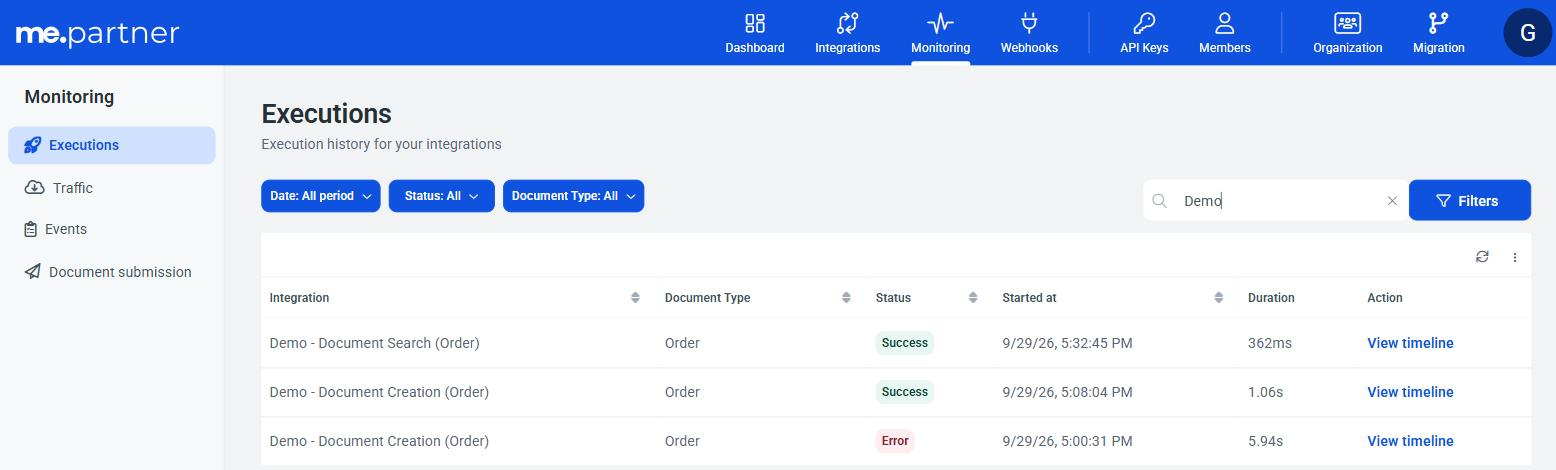
Execution list
Each row is an execution:
| Column | What it shows |
|---|---|
| Integration | The name of the executed integration. |
| Document Type | The integration's document type. |
| Status | The execution result. See the table below. |
| Started at | When the execution started. |
| Duration | Total execution time. |
| Action | View timeline opens the execution detail. |
The list is paginated and can be refreshed with the reload button next to the pagination.
Execution status
| Status | Meaning |
|---|---|
| Success | All steps were completed. |
| Error | A step failed. The timeline shows which one. |
| Timed out | The ME API or the provider did not answer the call in time. |
| In progress | The execution has not finished yet. In Inbound, this is the status while ME processes the document. |
📘 Note
Timed out only happens when the ME API or the provider does not answer the call made by iPaaS. If ME never returns the processing result of an Inbound document, the execution stays In progress: open a support ticket with the Correlation ID.
Filtering
At the top of the list there are three quick filters: Date (period), Status and Document Type. The Search field performs a free-text search.
Under Filters, you can combine criteria:
| Filter | Use |
|---|---|
| Correlation ID | Finds the execution by the value sent in x-me-correlation-id (or returned in correlationId). It is the most direct way to find a specific call. |
| Entity ID | Finds it by the document identifier in ME, for example the document created by an Inbound execution. |
| External Reference | Finds it by the document reference in your system. |
| Status | Success, Error, In progress or Timed out. |
| Document Type | The integration's document type. |
| Started at | Period in which the execution started. |
| Event Type | Business rule or Technical. |
Filters can be saved with a name and reused later, in the Saved filters section.
Execution detail (timeline)
Click View timeline to open the execution. The top shows:
- the result: Execution completed successfully, Execution failed at step "{step}", Execution in progress or Execution pending;
- the execution's Status, Duration and Correlation ID;
- a line with the execution steps, the status of each one and the time between them.
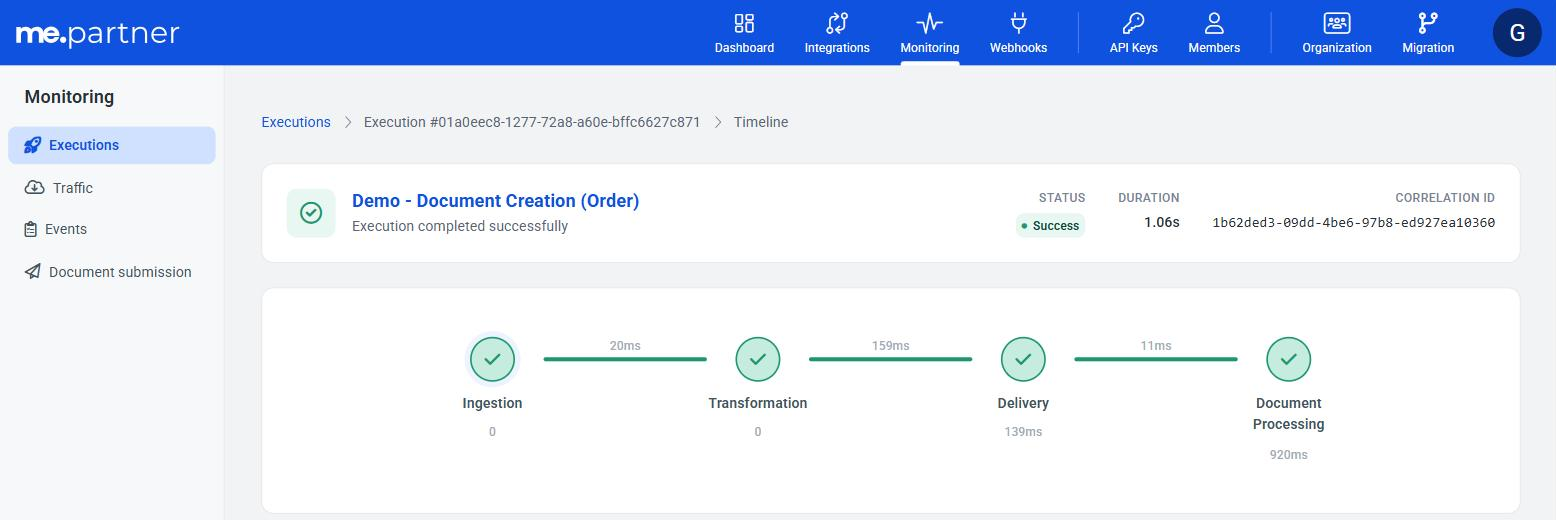
Below, the Events list shows each step of the execution, in the order in which it happened (for example Ingestion, Transformation, Delivery and Document Processing in Inbound). Each step shows:
| Information | Description |
|---|---|
| Status and Duration | Result and time of the step. |
| Event type | Business rule (e.g. document rejected by ME) or Technical (e.g. communication failure). |
| Severity | Info, Warning, Error or Critical. |
| Code and Error | Error code and message, when the step fails. |
| Validation errors | The validation fields and messages, when there are any. |
Some steps also show the data exchanged, so you can compare it with what your system sent:
| Step | Data displayed |
|---|---|
| Ingestion | The Headers and the Payload received. Identification headers, such as the access token, are not recorded. |
| Delivery (Inbound) | The Payload sent to the ME API, already converted. |
| Document Processing (Inbound) | The Message returned by ME and the Entity ID of the created document. |
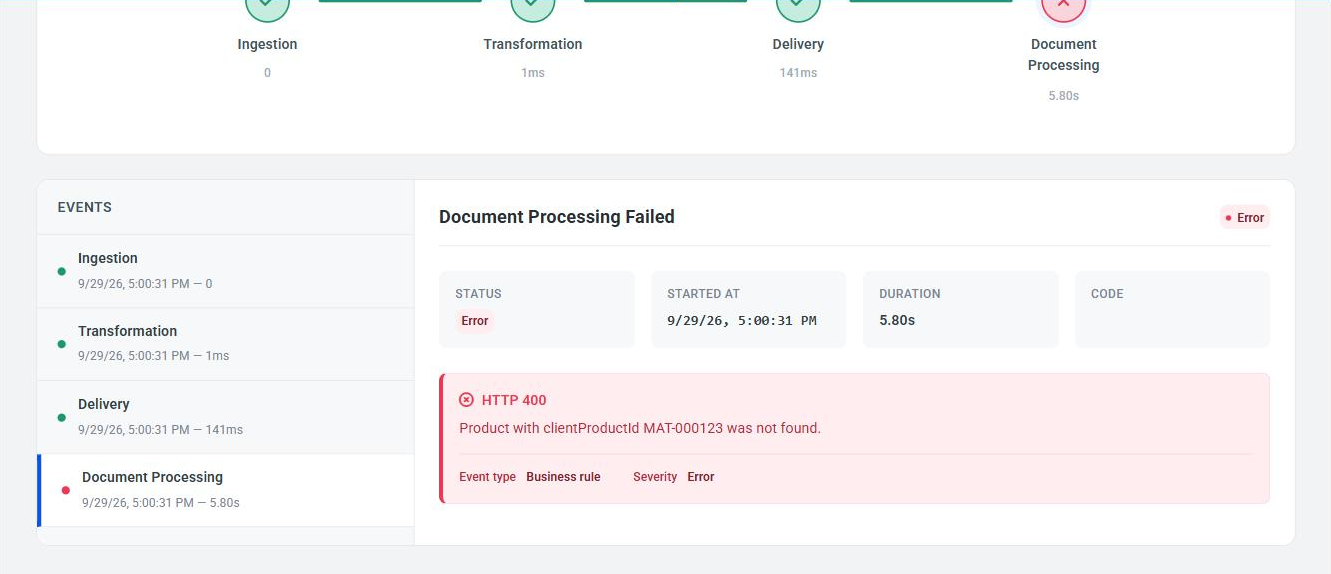
Click a step in the Events list to see its details. In the example below, from another execution of the same integration, ME rejected the document in the Document Processing step with HTTP 400 and the message returned by the ME API (the product provided does not exist in ME), classified as Business rule:
Finding a specific call
- Send the
x-me-correlation-idheader in the call, or store thecorrelationIdreturned in the response. - In Monitoring > Executions, open Filters and enter the value in Correlation ID.
- Click View timeline on the execution found.
- If there is an error, check the failed step, the message and the validation errors. If you need to open a ticket, provide the Correlation ID.
Relation with the Dashboard and Traffic
In the Document Creation (Inbound) template, the Delivery step calls ME's public APIs on behalf of your organization, just as your ERP would. That is why these calls also appear in the Partner's Portal general monitoring screens:
- in Traffic, as calls to the ME APIs (for example,
POST /v1/orders); - in the Dashboard, in the indicators and in the failure list of the Traffic and Integration result origins.
On these screens, the call does not carry the value you sent in x-me-correlation-id. iPaaS uses its own internal identifier in the call to the ME API. To investigate an iPaaS execution, always start with Monitoring > Executions, which shows all steps, including the ME API rejection in the Document Processing step.